CHAPTER 3: DIGITAL AUDIO

Foundation X Academy – Audio Engineering & Music Production Program

Overview

In today’s music industry, everything runs on digital audio.

This chapter breaks down how sound is converted from analog (real-world audio) into digital form inside your DAW. Understanding this process is critical for recording clean audio, avoiding quality loss, and making professional-level production decisions.
 WHAT YOU’LL LEARN

What digital audio is and how it works
Sample Rate (44.1kHz, 48kHz, etc.)
Bit Depth (16-bit, 24-bit, 32-bit float)
Analog-to-Digital Conversion (A/D)
Digital-to-Analog Conversion (D/A)
Latency and buffer size basics
File types (WAV vs MP3 vs AIFF)

🎬 WATCH THE LESSON

⚠️ IMPORTANT: Watch this full lesson before moving forward. This knowledge applies to every chapter after this.

WHY THIS MATTERS (REAL-WORLD APPLICATION)

If you don’t understand digital audio, you’ll:
• Record at the wrong settings
• Lose audio quality without realizing it
• Experience latency issues during recording
• Export files incorrectly for clients or streaming

Professional engineers control quality at the source.

🧪 QUICK PRACTICAL EXERCISE

Inside your DAW (Pro Tools recommended):

1. Go to Session Setup

2. Check your: Sample Rate (set to 44.1kHz or 48kHz) Bit Depth (set to 24-bit)

3. Record a short vocal clip

4. Export it as: WAV MP3

👉 Listen to the difference in clarity and quality

⚠️ COMMON BEGINNER MISTAKES

❌Recording at low bit depth (loss of quality)
❌Using wrong sample rate for projects
❌Ignoring latency settings (causes delay while recording)
❌Exporting MP3 instead of WAV for final mixes

📥 DOWNLOADABLE RESOURCE

Sample Rate & Bit Depth Guide
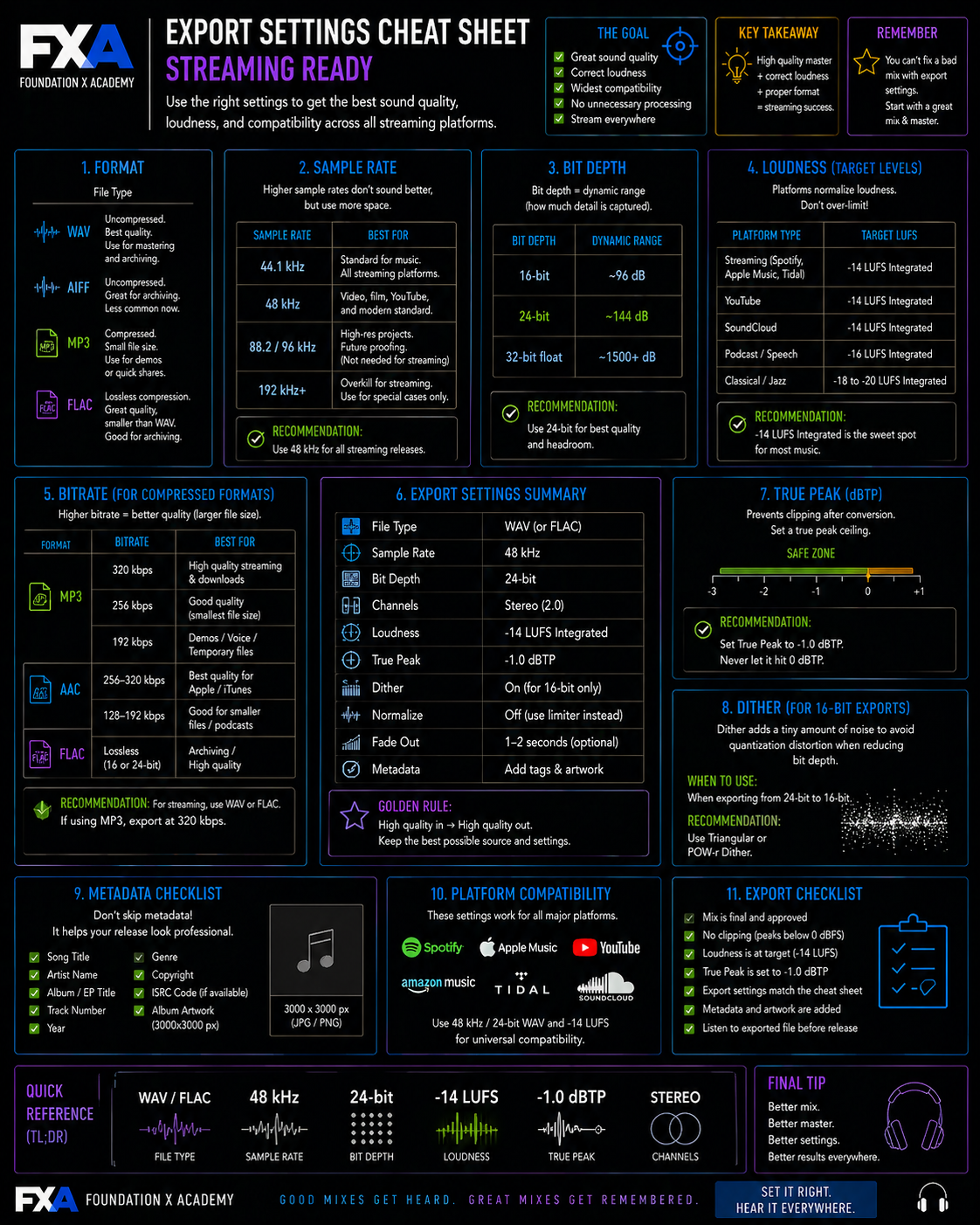
Export Settings Cheat Sheet (Streaming Ready)


Take Chapter 3- Digital Audio Test

A Passing Score of 70/100 is needed to proceed to next chapter.

🔒 MEMBER NOTE

This content is part of Foundation X Academy (Members Only)
Your access includes:
Full 20-chapter program
Real-world engineering techniques
Industry-level training without college debt